


Awako, a Transport Management System provider, had an outdated mobile app for truck drivers. This app was primarily developed by a team of developers a few years ago. Many drivers complained about its lack of user-friendliness. Additionally, there were frequent errors in route logging, which required significant effort from transport companies to revisit and correct the information.
To address these issues, the mobile app needed an updated and intuitive user experience tailored to the drivers. This experience should not overwhelm the driver and should present only relevant information and actions. To achieve this, the app must be able to recognize the current location of the driver. This can be done by matching geolocations with predefined waypoints or by considering the app's most recent action. By doing so, the app can present the most appropriate actions for the driver.
The project was developed using the Design Thinking Methodology, a proven 5-step process for crafting innovative and effective solutions. After discussions with the client, we selected the essential elements tailored to their budget and available intelligence. By meticulously adhering to this process, we were able to implement a solution that was both well-conceived and highly effective.

As the client wanted an actual product refinement, and they assigned their budget accordingly, they shared their earlier findings, therefore competitor review was reduced to understand how they solve the actual problems. To see these tutorials and recorded video sessions were used.
o gain a broader perspective, we analyzed how competitors manage these processes through their driver-facing apps. Since these applications are not easily accessible, we relied on mobile screen recordings and screenshots. For on hand experience we revieved other driver facing apps that are working under similar conditions.
User personas act as valuable reference points throughout the design journey, ensuring that design decisions align with users' genuine needs and expectations. By grounding the design process in such personalized, user-centric narratives, the client can develop more empathetic and effective solutions tailored to their target audience's genuine challenges and desires.

The client helped us recruit drivers who currently use the app to share insights about the difficulties they face and the features they miss. We prepared an interview blueprint and a list of key questions beforehand. The client hosted the sessions in their Palo Alto office, while we joined via conference call due to the distance. Although the Product Manager asked the primary questions, we were present on the call to ask follow-up questions whenever the situation required.
The "Jobs to be Done" (JTBD) framework focuses on the tasks users are trying to accomplish, emphasizing the motives behind user behavior. It provides a deeper understanding of why a user might adopt a product or service. Instead of focusing on the user persona or demographic, the JTBD framework focuses on the situational context and functional, social, and emotional outcomes.

User stories were created as a pivotal component in agile product development, serving as a concise, user-centric expression of features and functionalities desired by the end-user. Typically written from the perspective of the user, these narratives follow a simple format. By focusing on the user's goals and the value they seek, user stories help prioritize feature development based on genuine needs and provide clear criteria for acceptance testing.

The information architecture is carefully crafted to streamline the wealth of functionalities such as load acceptances, real-time notifications, and efficient reporting mechanisms into a cohesive, user-friendly structure. This structure serves as the backbone of the app, fostering easy navigation and accessibility, which is crucial in ensuring that users, regardless of their technological proficiency, can effectively interact with the app to accomplish their tasks with ease and efficiency.

The "Jobs to be Done" (JTBD) framework focuses on the tasks users are trying to accomplish, emphasizing the motives behind user behavior. It provides a deeper understanding of why a user might adopt a product or service. Instead of focusing on the user persona or demographic, the JTBD framework focuses on the situational context and functional, social, and emotional outcomes.

During the wireframing phase of the trucking app, the focus is to translate the insights gathered from the information architecture stage into a tangible blueprint. This process is vital to ensure a logical and user-friendly interface. The wireframes serve as a visual guide to represent the skeletal framework of the app, where each screen is designed with careful consideration to present information blocks and organizational principles clearly. This phase allows for the alignment of the app's structure with the frontend framework, making room for custom designs where necessary.

When creating a UI kit, it was crucial to tailor the design for a modern React-based design system. A meticulously designed system enables developers to craft simple screens independently, a significant advantage for complex SaaS platforms with numerous variations of specific screens.
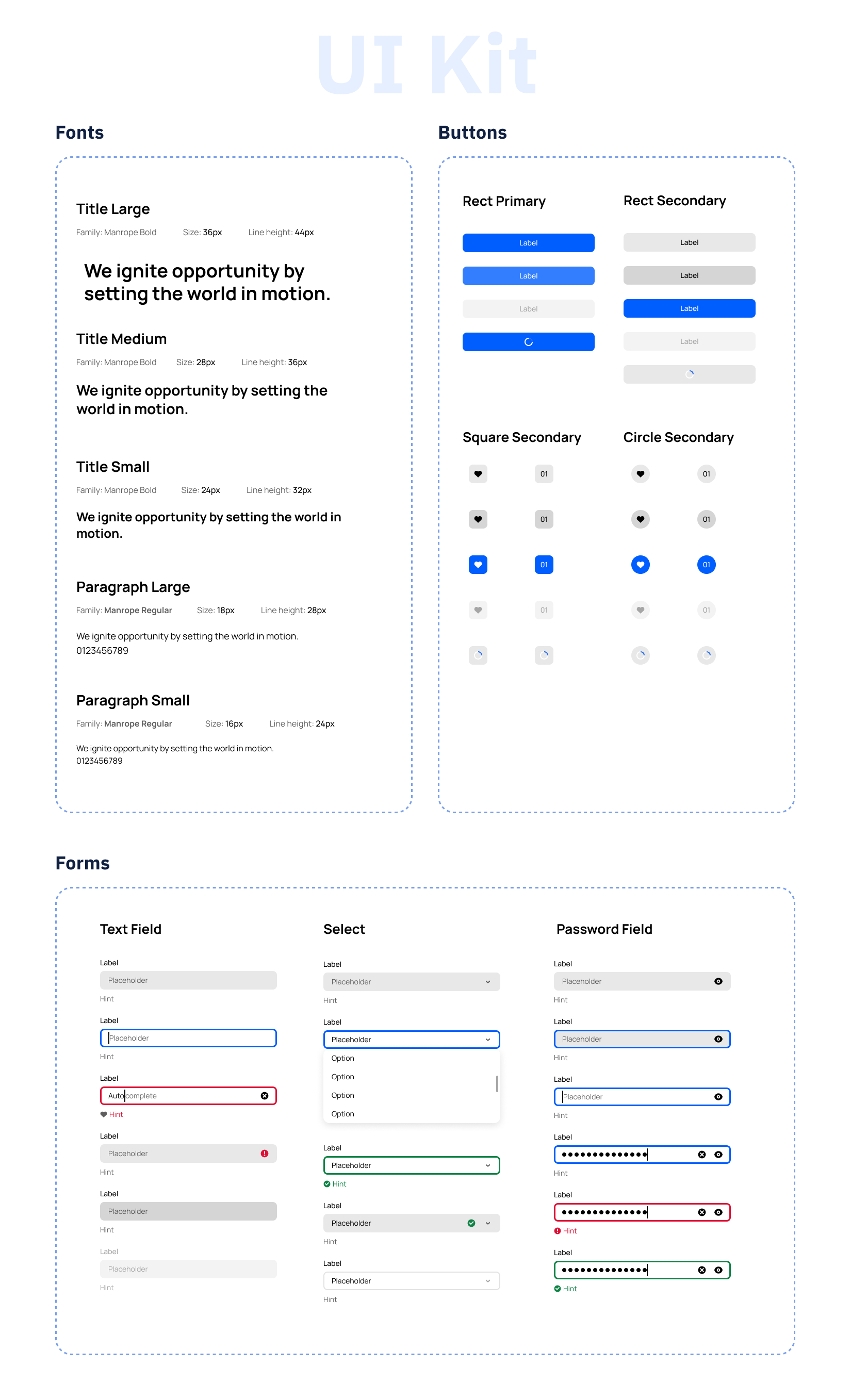
As the project advances towards the high-fidelity prototype stage, the anticipation builds, since this is where the conceptual meets reality, giving stakeholders a tangible sense of the app’s eventual look and feel. This phase is instrumental in bringing to life the carefully designed UI kit and the structured wireframes. In this stage, the prototype serves as a dynamic, interactive model of the app, demonstrating not only its aesthetic aspects but also its functional dimensions, showcasing the seamless flows.

To ensure the solution was intuitive, we validated our prototypes directly with end users using a hybrid testing strategy at the hi fidelity stage. we conducted moderated 1-on-1 interviews to observe deep behavioral nuances, alongside unmoderated task-based sessions via Maze to gather broader quantitative data. Participants navigated key user flows and completed post-test surveys, which helped us pinpoint specific friction points—particularly where the process lacked clarity or imposed a high cognitive load—allowing us to simplify the experience before development.
I executed a final implementation audit to verify that everything was built according to the provided design. I also stress-tested the application to identify potential issues and ensured that all edge cases were covered. This review confirmed that the application was not only visually aligned with our design system but also functionally robust and ready for scaling.
If you need help with UX design, UI, product research, or product planning for your website or mobile platform, reach out to SaaSXpert. We’re always happy to engage with new businesses and cater to all clients, from start-ups to global enterprises.
Contact Us